
How to Use the Voice Remover Tool on Ringtonehub9.com (100% Free)
Removing vocals from a song has become extremely popular for creating karaoke tracks, remixing music, or extracting background instrumentals for personal projects. Ringtonehub9.com offers a 100% free Voice Remover Tool that allows anyone to separate vocals from music quickly and easily—without installing any software or paying any fees.
This guide will walk you through how to use the Voice Remover Tool step by step.
Step 1: Visit Ringtonehub9.com
First, open your web browser and go to Ringtonehub9.com. Navigate to the Voice Remover Tool from the tools or menu section. The tool works smoothly on Android, iPhone, and desktop devices.
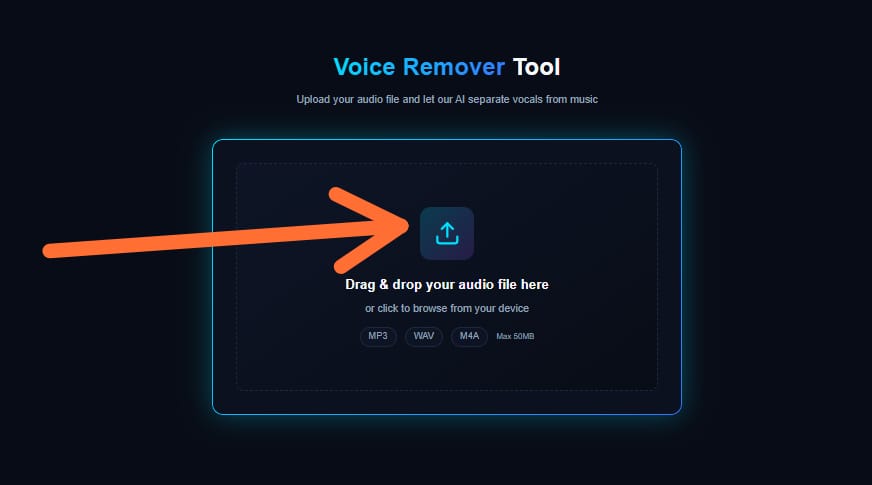
Step 2: Upload Your Audio File
Click on the Upload Audio button. You can upload common audio formats such as MP3, WAV, or M4A. Make sure the file is clear and not corrupted for the best results.
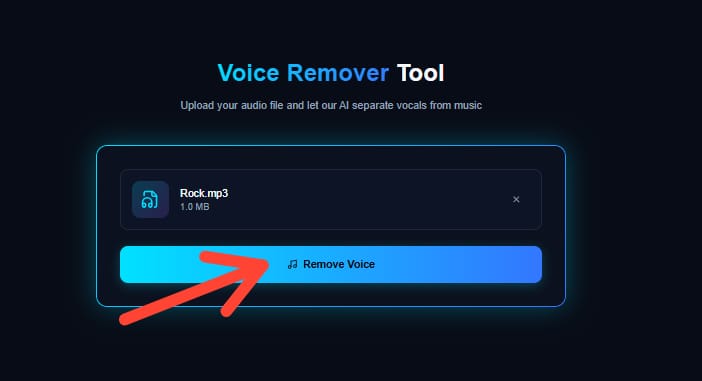
Step 3: Start the Voice Removal Process
Once your file is uploaded, simply click the Remove Voice or Process button. The tool uses advanced audio processing technology to separate vocals from background music automatically.
This process usually takes only a few seconds, depending on the file size and internet speed.
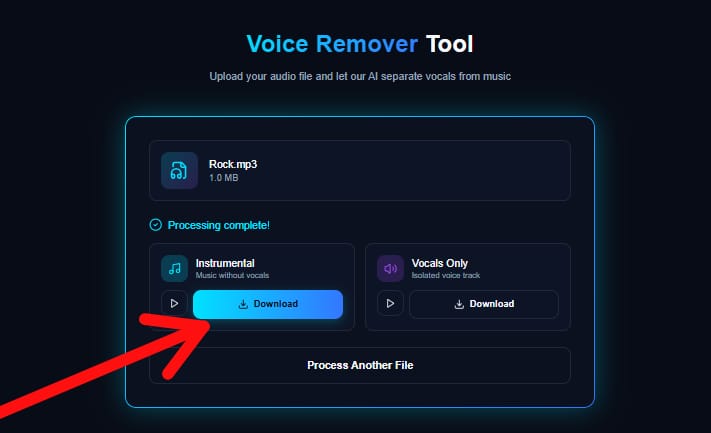
Step 4: Preview and Download
After processing, you can preview the instrumental or vocal-removed version directly on the website. If you are satisfied, click Download to save the file to your device.
There are no watermarks, no sign-ups, and no hidden charges.
Why Use Ringtonehub9.com Voice Remover?
-
100% Free to Use
-
No Registration Required
-
Fast and Easy Processing
-
Works on All Devices
-
Safe and Ad-Friendly Tool
Important Note
This tool is intended for personal and educational use only. Always respect copyright laws when using audio files.
Final Thoughts
The Voice Remover Tool on Ringtonehub9.com is a simple, reliable, and completely free solution for removing vocals from songs. Whether you want to create karaoke tracks or instrumental ringtones, this tool gets the job done effortlessly.
Try it today and enjoy hassle-free audio editing—absolutely free!
Key Features
Everything you need for professional vocal removal
100% Online
No software download required. Process audio directly in your browser from anywhere.
Fast Processing
Advanced AI technology delivers results in seconds, not minutes.
Works Everywhere
Fully responsive design works seamlessly on mobile, tablet, and desktop.
Free to Use
Start removing vocals for free with generous usage limits.
High Quality
Preserve audio fidelity with our professional-grade separation technology.
Secure & Private
Your files are processed securely and deleted automatically after processing.
Who Uses Our Voice Remover
Trusted by creators, musicians, and audio professionals worldwide
Karaoke Creation
Create your own karaoke tracks by removing vocals from your favorite songs.
Music Practice
Practice playing instruments or singing along with professional backing tracks.
Content Creators
Extract instrumentals for YouTube videos, podcasts, and social media content.
DJs & Remixers
Isolate vocals or instrumentals to create unique remixes and mashups.
Music Students
Study and analyze individual components of songs for educational purposes.
Audio Editors
Professional audio engineers use vocal separation for production workflows.
Trust & Safety
Your files are processed securely and deleted automatically after processing
Encrypted Processing
All file transfers use SSL/TLS encryption
Auto-Delete
Files removed immediately after processing
Privacy First
We never access or share your audio content
Secure Servers
Enterprise-grade infrastructure protection
What Users Say About Our Voice Remover Tool
Real feedback from users who removed vocals and created clean instrumental tracks using our Voice Remover tool.